The ePortfolios pilot, using PebblePad, is starting about now. There are perhaps 20 students from the Law and Criminology department who have volunteered for the pilot, and we'll be putting sports students on next.
The only training resource I've needed to create is a simple PDF document called PebblePad: First Steps because Pebble Learning provide some decent resources on their web site.
Finally Philippa Butler from the Massey University College of Education, New Zealand has created A Review Of The Literature On Portfolios And Electronic Portfolios which goes into much more depth than I did. I've only scanned it, but it looks like another useful perspective which references a lot of the research around portfolios.
Via: elearnspace
14 December, 2006
07 December, 2006
From VLE's to Learning Landscapes
Graham Attwell's presentation slides give a good overview of the move from VLEs to personal learning landscapes (which would include the use of eportfolios).
The images on pages 51 and 52 display both models well.
Via: The Wales Wide Web
The images on pages 51 and 52 display both models well.
Via: The Wales Wide Web
Labels:
VLE

01 December, 2006
Screencasting: ZDSoft's Screen Recorder
Another piece of screencasting software is ZDSoft's Screen Recorder.
A free version is available. There are fewer options than in Camtasia, and you need to close down other pieces of software that deal with audio to use it (trying to record the screen when using iTunes made my PC crash), but it allows you to record a number of videos directly into WMV format, even quicker than with Camtasia. We could then put them directly on to the streaming server.
If staff wanted to create screencasts, but didn't have copies of Camtasia, this looks like a good free alternative.
A free version is available. There are fewer options than in Camtasia, and you need to close down other pieces of software that deal with audio to use it (trying to record the screen when using iTunes made my PC crash), but it allows you to record a number of videos directly into WMV format, even quicker than with Camtasia. We could then put them directly on to the streaming server.
If staff wanted to create screencasts, but didn't have copies of Camtasia, this looks like a good free alternative.
Labels:
Screencast
Lightscribe Disk Labelling
I've been producing a few CDs to go external, and as I've not got CD labels (I've only just got a CD pen!) they don't look very professional.
So I got quite excited when, watching old episodes of GeekBrief, I heard mentioned the HP DVD 940e Multi DVD Writer. Using HP Lightscribe CDs and DVDs this allows you to quickly and easily burn professional looking labels on the CD/DVD. As we are doing more and more CDs and DVDs, this could pay for itself compared to buying labels.
Have a look at the way the burned CDs look.
So I got quite excited when, watching old episodes of GeekBrief, I heard mentioned the HP DVD 940e Multi DVD Writer. Using HP Lightscribe CDs and DVDs this allows you to quickly and easily burn professional looking labels on the CD/DVD. As we are doing more and more CDs and DVDs, this could pay for itself compared to buying labels.
Have a look at the way the burned CDs look.
30 November, 2006
New Virtual Learning Environment Name
As we are looking at upgrading our VLE from WebCT 4.1, we've been talking about rebranding it. This will mean that any changes in the future can be a little more transparent and all references to WebCT in documents wouldn't all need to be changed to for example Moodle, if we were to go that way.
Webteam called it 'myLearningSpace' on the portal. Personally I think this is a bit misleading as the VLE isn't your space, it's the teacher's space. 'Online Classrooms' would perhaps be more correct.
'myLearningSpace' would be better used to brand an eportfolio system like PebblePad, or a 'Personal Learning Landscape' like ELLG. These are actually spaces owned by the students.
Webteam called it 'myLearningSpace' on the portal. Personally I think this is a bit misleading as the VLE isn't your space, it's the teacher's space. 'Online Classrooms' would perhaps be more correct.
'myLearningSpace' would be better used to brand an eportfolio system like PebblePad, or a 'Personal Learning Landscape' like ELLG. These are actually spaces owned by the students.
Labels:
VLE
29 November, 2006
Subcribing to a Blog: www.feedblitz.com
In our work at Edge Hill University, we find that getting people to subscribe to blog feeds can be difficult because it seems like a new technology to understand.
If a class was using blogs in the course, and the teacher wanted to keep track of all the posts, they would need to.
If they don't want to use feed aggregators in for example Bloglines or a web browser, they could use www.feedblitz.com
I'm still testing the site, but I think that you register at the site, then subscribe to the blogs you want to keep track of. The service will then email you with the new posts each day (I think). I'll post again when I've tested it.
If a class was using blogs in the course, and the teacher wanted to keep track of all the posts, they would need to.
If they don't want to use feed aggregators in for example Bloglines or a web browser, they could use www.feedblitz.com
I'm still testing the site, but I think that you register at the site, then subscribe to the blogs you want to keep track of. The service will then email you with the new posts each day (I think). I'll post again when I've tested it.
17 November, 2006
Zamzar: Online File Conversion
I might be worth us keeping Zamzar.com in mind if we, or the academic staff that we are supporting do not have the necessary software to convert certain files.
There is a list of file types supported, and although it is in beta, it has worked OK for me.
If Zamzar doesn't do what you need, try Media-Convert.
Finally, if you want to keep track of it's development, subscribe to Zamzar's blog.
There is a list of file types supported, and although it is in beta, it has worked OK for me.
If Zamzar doesn't do what you need, try Media-Convert.
Finally, if you want to keep track of it's development, subscribe to Zamzar's blog.
02 November, 2006
Highlights of the SOLSTICE Conference
This video is a one-minute encapsulation of the May 2006 SOLSTICE conference.
SOLSTICE is Edge Hill's Centre for Excellence in Teaching and Learning. It's aim is to help develop a method of course delivery that has the use of technology integrated into it, rather than added on to it.
Either watch the high quality version (.wmv format) or watch the embedded version held on YouTube (below).
Details of the 2007 conference will be available soon.
SOLSTICE is Edge Hill's Centre for Excellence in Teaching and Learning. It's aim is to help develop a method of course delivery that has the use of technology integrated into it, rather than added on to it.
Either watch the high quality version (.wmv format) or watch the embedded version held on YouTube (below).
Details of the 2007 conference will be available soon.
Labels:
Conferences
28 September, 2006
An Overview of E-Portfolios
PDPs and E-portfolios
PDPs have been used at Edge Hill since the mid 1990s (Beaumont, 2003). The aim of them is to support students as they “develop an understanding of their own learning by reflecting on their own learning strategies and by developing their range of learning skills” (Schofield, 2004).
Originally the ‘Teaching and Learning Development’ department had more centralised control over PDP development in the instituation, but they have now been devolved to the individual faculties and HMSAS departments.
I assume e-portfolios will be best seen by us as an extension of PDPs. An extension that, because it is kept online, can allow any element to be made available to selected people, or to be made public. This can also move the focus from just keeping track of your own learning to letting other chosen people do the same, be that teachers, prospective employers, parents, etc. Trent Batson (2006) notes that it is often associated with “assessment, but also with accreditation, reflection, student resumes, and career tracking”. Put in that way it could be seen as a PDP that is not just put together in year one of your degree course, but which develops and helps you track learning over the whole of your life it you want. George Siemens (2004) sees it along these lines when he says:
“portfolios can best be viewed as a reactionary response to fundamental shifts in learning, teaching, technology, and learner needs in a climate where learning is no longer perceived as confined to formal education”.
Batson (2006) also distinguishes between e-portfolios (database-driven, dynamic Web sites) and Webfolios which have been used in the past (static, HTML-driven sites).
Potential Benefits of an E-Portfolio System
Batson (2006) notes that an e-portfolio can act to create a unifying theme for the student and their teachers in a modular degree, perhaps even allowing assessment of work from a range of modules. This could be a way of improving continuity between separate modules, especially if some were studied at other institutions.
Things that are Important from the Way an E-Portfolio System is Used
Batson (2006) notes that the e-portfolio needs to be integrated into the course and modules, if the student is to really see the benefit and get involved. This is complex and would take a lot of time and effort during course design. Academic staff would benefit from support from perhaps ‘Teaching and Learning Development’ and ‘Learning Technology Development’. This would involve the usual technical support, but also just as importantly, advice about integrating it into not only the module. To get the full benefit, their use would need to be integrated in to the whole course and entire learning experience.
Things that are Important from E-Portfolio Systems
If we are talking about a portfolio for lifelong learning, the system needs to allow interoperability between other current and future systems that the student might have access to. It also needs to be transferable to a static web site that can be hosted elsewhere, for when the learner is not a registered student at an institution with an e-portfolio system.
The system needs to be easy for the learner to use and maintain. It must be easy to pick up at first and do the basics, because the learner starting a course has much to take in with learning to use the various online tools, such as WebCT, the institution web pages, the library catalogue and electronic books and journals. All these need some time and a little effort from the students to learn how to use them. I would personally not want to see them having more complex systems to learn how to use, as we might be in danger of seeing the technology get in the way of the learning rather than supporting it.
According to Dave Tosh (2005) ELGG’s vision for e-portfolios includes making it easy for connections to be made and passed on to others in communities. This is not just about recording achievements; this view of the e-portfolio is wider and includes using this base to develop communities who learn together. Their conceptual framework (Chen, et al, 2005) demonstrates how this might work. This would be a further step in the use of such software, and again might involve integration into the curriculum.
Links to Examples of E-Portfolios Systems

- Campus Technology: ePortfolio Tools and Resources
- WebCT 6.0 Portfolio - WebCT’s portfolio system is integrated with version CE6.0 making it very easy to transfer various artefacts to the e-portfoio (WebCT 2006), such as assignments that had been submitted with the WebCT drop box. Whether this is a benefit, and how much of a benefit can be debated.
- PebblePad
- Wikipedia: Electronic Portfolios
- My Test Portfolio at Epsilen
- ELLG : My ELLG Site - ELGG is seen by it’s creators as part of a ‘Personal Learning Landscape’, which the learner can develop and grow (Dave Tosh, 2005). This means it is designed to be extended through links to other services.
Steps in Moving this Forward in the Institution
Mark Schofield has noted that there is a current audit of PDP at the moment. It looks like PDP is not yet fully integrated into the curriculum in some areas, and as we’ve seen argued above that is important to the success of PDPs or e-portfolios.
Any development of e-portfolios would have to follow on from the institutional stance on PDPs. This is good as it would mean the use would be focused. We don’t want to be administrating another system without good reason.
We would do well to get the Academic Staff who have expressed an interest in e-portfolios together along with Mark Scofield in TLD and others from SOLSTICE and LTD to talk about:
- What we might want to achieve from using PDPs and e-portfolios?
- Do any off-the-shelf systems meet these requirements or make them easier to meet. Could a simple bespoke system meet those needs?
- Is it worth doing a small scale pilot using one or more of the systems, including bespoke systems to test usability, time taken to learn and perform regular tasks, use that the students make of it?
Labels:
Portfolios
27 September, 2006
WebCT: Using the Calendar Tool as a Booking System
I was asked by a member of staff about sorting out a way of booking student appointments using WebCT.
We could look at creating collaborative documents using Writely, but that involves students having more passwords to remember.
Using the WebCT calendar means that the students have less steps to take in order to do what they want to.
I've recorded the process in the screencasts linked to below. They are in .wmv format.
1. Introduction
2. Changing the settings to public
3. Adding an entry
4. How the students add entries
We could look at creating collaborative documents using Writely, but that involves students having more passwords to remember.
Using the WebCT calendar means that the students have less steps to take in order to do what they want to.
I've recorded the process in the screencasts linked to below. They are in .wmv format.
1. Introduction
2. Changing the settings to public
3. Adding an entry
4. How the students add entries
14 September, 2006
Podcasting
You might want to take a look at this…
After mentioning the Apreso, automatic lecture capturing software, in the LTD team meeting yesterday I coincidentally opened an email from one of their representatives. It contained links to a couple of example lectures captured with this software.
Calculus at UMass:
http://content.apreso.com/apresos/ClassroomDemo/Calculus_101_2005-02-16_10-30-AM_files/flash_index.htm
Economics at Temple: http://content.apreso.com/apresos/ClassroomDemo/16181_FOXSP212_2005-01-26_02-40-PM.htm
* These links are best viewed in Windows Internet Explorer with Flash. This is because these customers chose to capture using Windows Media for video. Apreso also support cross-platform video options, such as Flash video.
"These lectures were captured without the faculty having to do anything. The capture started and stopped automatically, everything was digitized, compressed and synchronized, and the navigation thumbnails were all done automatically by the system. Then Apreso posted a URL to the customer’s learning management portal. No camera operators or media specialists needed to be involved. The content was ready for student viewing maybe 15-20 minutes after the lecture took place (basically, the time it took to send the content to the learning management system).”
From my point of view, the significant feature of Aspreso Podcast is the automation - the fact that the physical process/s required to provide lectures online is totally removed from the lecturer. Podcasting itself is not necessarily a complicated idea or process but it does require a level of commitment and consistency which is not always attainable.
If there is a demand for this type of resource, in principal this type of solution (one which takes away all the technological obstacles for tutors) is ideal. However, I don't think that Apreso is a system which we could buy into on a small scale for the purposes of a pilot. Maybe there are others? I'm not sure.
So, because of the level of investment required we would need first to seriously investigate the use of the resource from both academic and student viewpoints. Do lecturers want their students to listen again to every word that was said? Will students value this resource?
Additionally, whilst recording and podcasting lectures may be a straight forward way of incorporating audio resources into a course we also need to further investigate alternative uses for podcasting. I don't know if Apreso can do anything other than automatic lecture capturing? What about pre or post lecture material?
Personally I don’t think that this is going to be the best system for us – as least to start with. But I do think that podcasting itself is worth investigating further.
Some interesting ‘Podcasting ideas for use (and why)’ from Bristol University ILRT: http://www.bournemouth.ac.uk/eds/documents/podcasting_ideas.pdf
Although I did not attend any sessions at the Alt-C conference specifically concerned with Podcasting, some of the concerns and affordances of which were discussed centered on the following:
Pedagogic Value
Academic Resistance
Student Attendance
Attitude
Engagement
Flexibility
Student Access
Two points which stuck with me were:
Student Engagement: As a result of audio lectures, rather than intense content recording, students were able to fully engage with the information through noting times of key points.
and
Academic Resistance: Some lecturers had concerns about being recorded. What if I say something I wish I hadn’t? My flippant comments now available for review!
After mentioning the Apreso, automatic lecture capturing software, in the LTD team meeting yesterday I coincidentally opened an email from one of their representatives. It contained links to a couple of example lectures captured with this software.
Calculus at UMass:
http://content.apreso.com/apresos/ClassroomDemo/Calculus_101_2005-02-16_10-30-AM_files/flash_index.htm
Economics at Temple: http://content.apreso.com/apresos/ClassroomDemo/16181_FOXSP212_2005-01-26_02-40-PM.htm
* These links are best viewed in Windows Internet Explorer with Flash. This is because these customers chose to capture using Windows Media for video. Apreso also support cross-platform video options, such as Flash video.
"These lectures were captured without the faculty having to do anything. The capture started and stopped automatically, everything was digitized, compressed and synchronized, and the navigation thumbnails were all done automatically by the system. Then Apreso posted a URL to the customer’s learning management portal. No camera operators or media specialists needed to be involved. The content was ready for student viewing maybe 15-20 minutes after the lecture took place (basically, the time it took to send the content to the learning management system).”
From my point of view, the significant feature of Aspreso Podcast is the automation - the fact that the physical process/s required to provide lectures online is totally removed from the lecturer. Podcasting itself is not necessarily a complicated idea or process but it does require a level of commitment and consistency which is not always attainable.
If there is a demand for this type of resource, in principal this type of solution (one which takes away all the technological obstacles for tutors) is ideal. However, I don't think that Apreso is a system which we could buy into on a small scale for the purposes of a pilot. Maybe there are others? I'm not sure.
So, because of the level of investment required we would need first to seriously investigate the use of the resource from both academic and student viewpoints. Do lecturers want their students to listen again to every word that was said? Will students value this resource?
Additionally, whilst recording and podcasting lectures may be a straight forward way of incorporating audio resources into a course we also need to further investigate alternative uses for podcasting. I don't know if Apreso can do anything other than automatic lecture capturing? What about pre or post lecture material?
Personally I don’t think that this is going to be the best system for us – as least to start with. But I do think that podcasting itself is worth investigating further.
Some interesting ‘Podcasting ideas for use (and why)’ from Bristol University ILRT: http://www.bournemouth.ac.uk/eds/documents/podcasting_ideas.pdf
Although I did not attend any sessions at the Alt-C conference specifically concerned with Podcasting, some of the concerns and affordances of which were discussed centered on the following:
Pedagogic Value
Academic Resistance
Student Attendance
Attitude
Engagement
Flexibility
Student Access
Two points which stuck with me were:
Student Engagement: As a result of audio lectures, rather than intense content recording, students were able to fully engage with the information through noting times of key points.
and
Academic Resistance: Some lecturers had concerns about being recorded. What if I say something I wish I hadn’t? My flippant comments now available for review!
Further piloting is in my mind the next step. Perhaps automation is the way forward if such pilots prove successful enough to warrant expansion.
30 August, 2006
ePortfolios
I've had requests from several members of academic staff regarding using E-Portfolios.
To be honest I've not read much about these, and why people are using them. George Siemens wrote (in 2004) an article, with links that might help start an exploration of this.
I've heard good things from Edge Hill staff (it might have been Jo Shoba) about 'PebblePad' which is an ePortfolio system created by eLearning experts from the University of Wolverhampton and staffed by their graduates. Click on 'PebblePad Presentation Video' on the PebblePad home page for an introduction and then look at the help videos to see what the software looks like to use.
We need to look at making a decision about where we want to go with ePortfolios, as Law would like to start using them this year. It might be good to start a debate by bringing someone in to do a presentation about PebblePad, or to do some research and present it ourselves... this will get a range of people from the institution together, to talk about what we want.
To be honest I've not read much about these, and why people are using them. George Siemens wrote (in 2004) an article, with links that might help start an exploration of this.
I've heard good things from Edge Hill staff (it might have been Jo Shoba) about 'PebblePad' which is an ePortfolio system created by eLearning experts from the University of Wolverhampton and staffed by their graduates. Click on 'PebblePad Presentation Video' on the PebblePad home page for an introduction and then look at the help videos to see what the software looks like to use.
We need to look at making a decision about where we want to go with ePortfolios, as Law would like to start using them this year. It might be good to start a debate by bringing someone in to do a presentation about PebblePad, or to do some research and present it ourselves... this will get a range of people from the institution together, to talk about what we want.
Labels:
Portfolios
23 August, 2006
Embedding Resources from Video Sharing Sites in WebCT
I've been asked about using these resources in teaching and learning. While downloading and capturing sections of these resources would break copyright law, we can link to and embed videos hosted elsewhere.
For example:
youtube.com
When you are on YouTube.com, look at the 'About This Video' section on the right of the screen. Select the contents of the 'Embed' text box and paste it into the WebCT Text Block on an organiser page.
The result would look like:
Other sites which you might want to use aren't demonstrated here, but if you have rights to access the Developer Community at Edge Hill University, you can see how they work. Choose 'Other Resources' > 'Incorporating Videos from Video Sharing Sites a WebCT area'.
For example:
youtube.com
When you are on YouTube.com, look at the 'About This Video' section on the right of the screen. Select the contents of the 'Embed' text box and paste it into the WebCT Text Block on an organiser page.
The result would look like:
Other sites which you might want to use aren't demonstrated here, but if you have rights to access the Developer Community at Edge Hill University, you can see how they work. Choose 'Other Resources' > 'Incorporating Videos from Video Sharing Sites a WebCT area'.
Labels:
Video
14 August, 2006
Nikon D50 Camera Guide
We now have a Nikon D50 camera for the Learning Technology Development team to use.
If you want to know how to use it, KenRockwell.com has a created
If you want to know how to use it, KenRockwell.com has a created
Labels:
Images
10 August, 2006
Blogs and Building Online Communities
We are getting more academic staff wanting to look at use blogs in teaching and learning. In my mind, the only current reason we would want to use blogs in HE is to develop communities of learners.
Nancy White on the Full Circle Online Interaction Blog has several posts (part 1, part 2, part 3, part 4, part 5) about the types of communities that can be developed around blogs. These ideas form a useful starting point for thinking about what we might want to achieve through using blogs, and how we might go about using them in collaboration with other technologies.
Nancy starts off by looking at what constitutes a community, and how that might be different from a network where people have perhaps one off interactions looking for help or assist each other completely impersonally using social bookmarking sites like del.ici.ous.
Indicators of community are looked for, such as evidence of people caring about the development of the group rather than just themselves, group identity and group language. For more about community indicators have a look at who is talking about the phrase through Technorati. This idea if developed further can help us see if the communities that we are trying to develop, are developing to any great extent.
The three types of communities identified are:
Nancy White on the Full Circle Online Interaction Blog has several posts (part 1, part 2, part 3, part 4, part 5) about the types of communities that can be developed around blogs. These ideas form a useful starting point for thinking about what we might want to achieve through using blogs, and how we might go about using them in collaboration with other technologies.
Nancy starts off by looking at what constitutes a community, and how that might be different from a network where people have perhaps one off interactions looking for help or assist each other completely impersonally using social bookmarking sites like del.ici.ous.
Indicators of community are looked for, such as evidence of people caring about the development of the group rather than just themselves, group identity and group language. For more about community indicators have a look at who is talking about the phrase through Technorati. This idea if developed further can help us see if the communities that we are trying to develop, are developing to any great extent.
The three types of communities identified are:
- Communities based around one blogger, who has readers and commenters. Some of these commenters have their own blogs. If the main blog disapeared the community would too.
- Topic centric communities which might look similar to a network. The blogs in this link to each other, and the fall of one, while taking from the community, would not damage the community a huge amount. There is no centre in this type of community and often events are organised to bring the actors and influencers together.
- Community centric groups would be based on a single plaform meaning that links between blogs and RSS feeds are used less. The important thing is who is commenting on whose blog. MySpace would be an example, as would I guess, a community based in a VLE with discussion boards and other tools available. These have very clear boundaries as we are used to with WebCT.
Would any academics want a more open community than this third example, with links to other institutions and the students there? Would this be acceptable and could this create a synergistic relationship locally, nationally or internationally between many students studying the same subject or specific area of a subject? If we did want this WebCT would not be the tool to use. We would need something more open.
Labels:
Blogs
17 July, 2006
Using a VLE: A Student Perspective
I think we all agree that it is important for those involved in developing the use of technology in the institution, to understand the various student experiences of using the technology.
Campus Technology has an article written by a student at the end of their studies, looking back at their experiences of using Blackboard.
I think that what he says has relevance to Edge Hill, especially the point that when teachers used the VLE sporadically Blackboard went from being benefical to being harmful to the students' learning.
Campus Technology has an article written by a student at the end of their studies, looking back at their experiences of using Blackboard.
I think that what he says has relevance to Edge Hill, especially the point that when teachers used the VLE sporadically Blackboard went from being benefical to being harmful to the students' learning.
Labels:
VLE
29 June, 2006
WebCT and Pop-up Blockers
Pop-up blocking software is becoming more widely used, and this is causing major problems with off campus students using WebCT 4.1.
We need for formal mechanisms for dealing with this if we are going to be able to cope with using WebCT Version 4.1 for another year.
Meg has found some very useful links via the very useful Dr. C (Dr. C is something I'd miss if we do end up moving to another VLE).
Pop-Up Killer Review looks like a fantastic resource. Sending a student to the Detect Page will allow them to see if they have Pop-Up blocking software enabled on their machines. The Pop-Up Blocker Detector Software available for free from here will talk anyone through how to disable pop-up blocking for many different pieces of software.
We'll look at how we can pass this knowledge on in a simple way to students, as it seems many avoid using WebCT becasue of it. It sounds like not all students ask for help when they come across the problem.
We need for formal mechanisms for dealing with this if we are going to be able to cope with using WebCT Version 4.1 for another year.
Meg has found some very useful links via the very useful Dr. C (Dr. C is something I'd miss if we do end up moving to another VLE).
Pop-Up Killer Review looks like a fantastic resource. Sending a student to the Detect Page will allow them to see if they have Pop-Up blocking software enabled on their machines. The Pop-Up Blocker Detector Software available for free from here will talk anyone through how to disable pop-up blocking for many different pieces of software.
We'll look at how we can pass this knowledge on in a simple way to students, as it seems many avoid using WebCT becasue of it. It sounds like not all students ask for help when they come across the problem.
15 June, 2006
blog.ac.uk 2006
I took part in the blog.ac.uk educational conference on the 2nd June. The aim of this get together was to "provide a central point to help focus and drive forward the existence of the UK and web 2.0 educational blogging community"
There are several perspectives on the day out there from Josie Fraser, Stephen Downes, Stephen Powell, Barbara Ganley, Ewan McIntosh, Miles Berry, and various photographers!
Before the conference, my perspective was that I wanted us to get academic staff using blogs themselves, before they will really be able to consider using them in their own teaching. Being at the conference inspired me to think through some further related issues.
Step One: We also need to communicate and demonstrate why and how blogs can improve students learning, to academic members of staff. I think that a list of technologies including blogs with potential uses, and the comparative benefits of each would be a good first step in helping us communicate. This could include links to some more screencasts to demonstrate their use in different situations.
Step Two: I'm not sure that many academic members of staff would be happy to be using externally hosted blogs. I've mentioned using things like Bloglines or Flickr to host blogs and images externally, and got replies connected to issues with control. I guess that means we would have to install blogging software at Edge Hill.
I think there is an obvious use for blogs in professional development courses, currently when the course closes (and our licence requires this) the community closes. A blog could live on after the course for as long as the community wanted it to, and with the professional development courses there would be a reason for it to live on.
There are several perspectives on the day out there from Josie Fraser, Stephen Downes, Stephen Powell, Barbara Ganley, Ewan McIntosh, Miles Berry, and various photographers!
Before the conference, my perspective was that I wanted us to get academic staff using blogs themselves, before they will really be able to consider using them in their own teaching. Being at the conference inspired me to think through some further related issues.
Step One: We also need to communicate and demonstrate why and how blogs can improve students learning, to academic members of staff. I think that a list of technologies including blogs with potential uses, and the comparative benefits of each would be a good first step in helping us communicate. This could include links to some more screencasts to demonstrate their use in different situations.
Step Two: I'm not sure that many academic members of staff would be happy to be using externally hosted blogs. I've mentioned using things like Bloglines or Flickr to host blogs and images externally, and got replies connected to issues with control. I guess that means we would have to install blogging software at Edge Hill.
I think there is an obvious use for blogs in professional development courses, currently when the course closes (and our licence requires this) the community closes. A blog could live on after the course for as long as the community wanted it to, and with the professional development courses there would be a reason for it to live on.
Labels:
Blogs
08 June, 2006
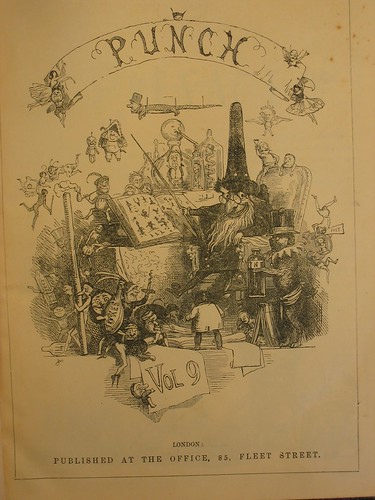
Digitised Books on Flickr: Punch Volume 9
I was asked by Margaret from the English department to digitise some old volumes of Punch and Boy's Own Paper.
The next question was how to make them available for access. WebCT's Image Database tool was a possibility (see on Edge Hill's WebCT: Developer Community > Other Resources > WebCT Tools - very basic examples > Image Database...) but is time consuming to upload images and they are only available in one WebCT area.
Flickr looked more attractive to me as it has upload software which makes the process of uploading a large number (100s) of images perhaps 20 times faster than with WebCT. Not only that but the images are then available for the whole world to use, in various different sizes. The only drawback was a small monthly upload limit (20 MB) unless you pay (then you get 2GB), which will mean I'll have to upload the images over about 4 months unless I upgrade the account for $25 (about £15).
For example you could link to the image (automatically converted to different sizes) from WebCT:
Cover: Large
Cover: Medium
Cover: Small
Cover: Thumbnail
Cover: Square (which could be downloaded and used as icons in WebCT).
The files uploaded so far are available (out of order) for you to look at.
Finally, another interesting use of Flickr allows you and other people in your group to add annotations to the pictures. This can be used to point interesting things out, or add interesting or important information about the picture.
By the way, there are more images available from Punch 1942-1959 as are details of when each early volume and issue were released.
The next question was how to make them available for access. WebCT's Image Database tool was a possibility (see on Edge Hill's WebCT: Developer Community > Other Resources > WebCT Tools - very basic examples > Image Database...) but is time consuming to upload images and they are only available in one WebCT area.
Flickr looked more attractive to me as it has upload software which makes the process of uploading a large number (100s) of images perhaps 20 times faster than with WebCT. Not only that but the images are then available for the whole world to use, in various different sizes. The only drawback was a small monthly upload limit (20 MB) unless you pay (then you get 2GB), which will mean I'll have to upload the images over about 4 months unless I upgrade the account for $25 (about £15).
For example you could link to the image (automatically converted to different sizes) from WebCT:
Cover: Large

Cover: Medium
Cover: Small
Cover: Thumbnail
Cover: Square (which could be downloaded and used as icons in WebCT).

The files uploaded so far are available (out of order) for you to look at.
Finally, another interesting use of Flickr allows you and other people in your group to add annotations to the pictures. This can be used to point interesting things out, or add interesting or important information about the picture.
By the way, there are more images available from Punch 1942-1959 as are details of when each early volume and issue were released.
Labels:
Images
01 June, 2006
Example Fastrack 2006 WebCT Induction
Here is the 'Example Fastrack 2006 WebCT Induction' course.
It is in .wmv format. If you do not have the software to view it, we recommend that you install Windows Media Player version 8.0 or above.
Introduction
Introduction to WebCT
Accessing and Using Your Course Area
Resources and Tools
It is in .wmv format. If you do not have the software to view it, we recommend that you install Windows Media Player version 8.0 or above.
Introduction
Introduction to WebCT
Accessing and Using Your Course Area
Resources and Tools
Labels:
Screencast,
VLE,
WebCT
Subscribe to:
Comments (Atom)