03 November, 2005

Enabling Collaborative Document Creation

3 comments
People keep mentioning the need to create collaborative documents.

Firstly working on the new WebCT area for the Edge Ahead team, we want people to add links, and thoughts and ideas to documents… but at least in the short term we are not wanting to train them to upload and download documents into WebCT.

The second issue was brought up by Lindsey Martin, regarding the lack of options for students wanting to work collaboratively on documents. Unlike staff, students don’t have a G:Drive, meaning collaborative work on documents is difficult. Lindsey was interested in using a website called Writely and seeing if the use of this was realistic.


I therefore want to compare the uses of two technologies, to look at their use in the collaborative development of documents.


WebCT Student Presentations Tool: This is an area that a group of students are given access to. They must upload files, the same way the course designer can, to create a website within WebCT.

Benefits: Allows anyone in a group to upload documents into and download documents from WebCT.

Anyone can visit the site that is created, and the URL of the document can be linked to from elsewhere in the WebCT area for anyone to see (as long as the name of the document is never changed).

Drawbacks: No version control. Two people could be working on the same document at once.

Requires some training on how to upload files to WebCT.


Writely: This is an online application which allows the creation and development of documents by a group of invited people.

Benefits: Once the document is created online, or uploaded to Writely, the URL can be linked to.
The ‘Edit this page’ link allows anyone who has been invited to make changes in a user-friendly seamless manner.


Writely allows version control. Users are warned that someone is already developing a document that you’ve logged into. Not only that, but you can look back and see who made what changes when.


Drawbacks: Setting up the document and giving permissions might require some training.

With the documents being stored externally, we have no control over the site disappearing one day. However, all your documents can be saved in a zip file and downloaded, which means if people take responsibility to do occassional backups, this is much less of an issue.

It requires a user to log in again to edit pages (unless they set machine to remember password – which is not always possible if people are sharing machines).


My conclusions:

I would like to pilot both methods, but I think we need to create training materials.

Firstly we could ask the Edge Ahead team to trial Writely, as it could make it easier for them all to quickly add to documents.

We'll post any feedback from the trials, and if anyone has or wants to try using these technologies, it would be interesting to get feedback their use and on any training materials that are created.

31 October, 2005

del.icio.us

0 comments
del.icio.us is basically a way of sharing "bookmarks" online, allowing you to see the most popular sites related to various topics. You write tags for each of your pages (for example 'Cakes' might be tagged 'blog elearning technology higher_education'), so that people searching for those topics will see those pages.

If you go to the del.icio.us homepage and select one of the topics on the right hand side, such as web2.0. You can look through the sites most recently tagged as this, or the most tagged sites.

This is an alternative way of searching than Google, for example. It is interesting because, in the spirit of Web2.0, it is the user who is tagging the content, making up new tags (folksonomy) and recomending the content.

20 October, 2005

Elearning 2.0

0 comments
Stephen Downes writing in elearn magazine has written an article called E-learning 2.0 which follows on nicely from our recent Web 2.0 post.

Looking at the ideas raised in the Web 2.0 discussion (collaboration, the read/write web) he relates general trends and developments to elearning.

BBC iMP- Integrated Media Player trial

3 comments
A few months back Mark Roche brought this BBC Integrated Media Player trial to our attention. Sadly, I think it is too late to volunteer to participate now, but I'm posting to let you all know where it is up to.

The iMP would allow anyone who downloads the software, to download and watch BBC programs that have been on air. Currently this is being tested with a few people, but hopefully this will be sucessful and be made available to a wider audience.

This might allow us to link to TV programs from WebCT, if students downloaded the iMP software. Also the programs can be watched on mobile devices. We'd have to look into all the issues first of course.

A 30 minute program is a 140Mb download, and the system requirements needed are:

-Processor PC Pentium 4 or above
-Operating System Windows 2000 or Windows XP
-Browser Internet Explorer 5.5 or above
-Windows Media Player 9 or above.If you have a compatible mobile device or portable media centre you need Windows Media Player10.
-Screen Resolution 1024x768 or above
-Video Card Spec 64MB Video card or above
-Memory 512MB RAM or above
-Connection Speed 512kbps or above

17 October, 2005

Audio Development Project: Attendance Issues

1 comments
At the SOLSTICE launch last Thursday, there seemed to be a real interest in some of the work that has been done online, from video and audio materials to the online skills audit and training.

Talking to people about audio recording of lectures, the whole issue of whether students will continue to turn up for lectures is brought up.

This recent document entitled 'Audio Recording of Lectures' details research done at Oxford University. Here the lecturer sees no noticable drop in attendance after recordings were made available. Does anyone know of other research?

Also interesting are student comments at the end of the above document. They see recordings as useful for revision or when missing a lecture is unavoidable. The value of personal contact in a face-to-face lecture is also noted. One student notes that the needs of hard-of-hearing students will have to be met in another way (eg. transcripts of lectures).

WebCT/Blackboard Merger + Boost your brain power

0 comments
George Siemens' blog is often an interesting read. He has collected various views on the effect of the Blackboard takeover of WebCT.

And from CNN, on a slightly different subject... So that's where my IQ's gone! But seriously, this article gives some helpful tips about working at your mental peak.

10 October, 2005

MP3 Recorder

2 comments
This is the MP3 player we are going to get to continue Rob Spence's Audio lecture pilot. It will record direct to MP3.

When you plug the SSS-1's USB lead (provided) into your PC or laptop, Windows XP/2000 will "see" it and immediately mount it as a drive. You may then drag-and- drop (transfer) files from the SSS-1 to your computer or your network using Windows Explorer in the normal way. Unlike with most MP3 recorders you do not need to load any special software at all to do this.

This is just the quick and easy solution we have been looking for.

Available from Solid State Sound

Web 2.0

0 comments
Web 2.0 is a phrase perhaps chosen, more to ask us to acknowledge that the Web has changed in the last 10 years, than suddenly changed now.

Here I want to identify what those changes broadly are, before (time permitting) in later posts, moving on to looking at how this affects the opportunities for learning and teaching online, and most importantly how learning itself occurs differently. Of course in the spirit of Web 2.0, it would be great to get others involved in discussion on this topic either here, or for those from Edge Hill, to discuss in the Developer’s Information Base WebCT area.


Scott Wilson in his blog on October 04, 2005 includes the following concepts.


"Technology: Web 2.0
Web as ecosystem
– Small pieces loosely joined
– Emergent behavior from connections
– Stable linking reduces the need of co-location for stability


Web as conversation
– Read/write web
– Blogging
– Content is continuously created, remixed, and rediscovered"


So examples of technology allowing this are:

Wikis (eg. Wikipedia) – People work together to develop knowledge base.

CMap – Public mind maps/concept maps that can be updated by a group or anyone.


O’Reillys’ article:

What Is Web 2.0: Design Patterns and Business Models for the Next Generation of Software

talks about the dotcom crash being the turning point in the web and lists ‘before’ and ‘after’ software as examples of what happened in the change.

"In our initial brainstorming, we formulated our sense of Web 2.0 by example:

Web 1.0 --> Web 2.0


DoubleClick --> Google AdSense
Ofoto --> Flickr
Akamai --> BitTorrent
mp3.com --> Napster
Britannica Online --> Wikipedia
personal websites --> blogging
evite --> upcoming.org and EVDB
domain name speculation --> search engine optimization
page views --> cost per click
screen scraping --> web services
publishing --> participation
content management systems --> wikis
directories (taxonomy) --> tagging ("folksonomy")
stickiness --> syndication"

They also mention the need to see it as an attitude rather than a technology, and I think that is vital to understanding the changes. We can still do the things we did before (eg. Text on a website) but we are beginning to think that collaborative technologies (which are now easily available) are better at developing learning, and learning communities.

I think if I was presenting the Web 2.0 concept to academics (our customers) for the first time, the Britannica Online --> Wikipedia example above would be a great starting point to explain the paradigm shift required to move our use of the Web and e-learning to this next level we are talking about. And the Content Management Systems --> Wikis example challenging to the way we currently use WebCT.

05 October, 2005

The Encyclopaedia of Educational Technology

6 comments
Visit the Encyclopaedia of Educational Technology to have a look at some short interesting articles on technologies and related issues.

I'd been working towards us in Learning Technology Development creating somthing similar, but aimed at the audience of academics in Edge Hill. It would answer the questions we are being asked, and help those at Edge Hill develop their own technology use and related pedagogic understanding.

This Encyclopaedia though, will do at least part of that.

27 September, 2005

Creating MP3s

0 comments

If you have created a .wav file you might want to save it as an MP3 for download and distributing. This can be done using software called Audacity.


The link to the Audacity application is:


http://audacity.sourceforge.net/

Because the MP3 algorithm is copyright, they cannot include export to MP3 capabilities directly into the software. If you choose the Export to MP3 option you will be asked for a .dll file, which is available in LAME:


http://lame.sourceforge.net/

Use of Weblogs in Education

3 comments
ELGG radio have released their next interview with those who are influential in online learning.

This interview is with James Farmer, about the right way to use blogs in education.

24 August, 2005

Blogger For Word

0 comments
The Learning Technology Development team might be interested to learn that you can now update Cakes from within Word.

The Blogger For Word add-in is available on our G:Drive under Software, and gives you an extra toolbar in Word to create and update Blogs. If you are most comfortable working in Word, this allows a more integrated blogging experience!

If you don't have access to the LTD G:Drive you can download it yourself.

22 August, 2005

BBC Video Archive

1 comments
The BBC are currently running a pilot project where about 100 video clips are released to the public for non-commercial use.

Some might be useful as stock footage for any videos we make. See: http://www.bbc.co.uk/calc/radio1/content.shtml

The pilot will finish in summer 2006. If all the BBC's stakeholders buy into the idea, it may grow to be a much larger, and useful collection - perhaps even including entire TV programmes for download.

11 August, 2005

ELLG Podcasts

0 comments
Look on the ELLG web site for Podcasts featuring interviews with the more influential people in the field of elearning.

Check out:

http://elgg.net/radio.php

The first one is with George Siemens who has some interesting ideas relating to the uptakes of technologies. to listen to it you can copy the next line into the address bar of your web browser.

http://elgg.net/elggradio/files/378/1272/invite_gs_10-aug-2005.mp3


He points out that at first, people will use the new tool to do exactly what they had done before... and as their understanding of the technology increases, they see new uses for it.

I guess that is how we in LTD see the academics staff's use of WebCT developing. It is to be expected that initial use is simple (perhaps putting documents online) and as the academic staff's knowledge of the medium develops (hopefully partly due to LTD's experience and expert advice) the technology will perhaps see more of its potential used.


05 August, 2005

Google Video

0 comments
Google continue with their mission to organise all the worlds information with Google Video.

Currently a Beta release, it searches through the text descriptions and closed captioning of videos in googles archives for words or terms that you search for.

Some are viewable (although you need to install Google's free viewing software), and with other videos you can just read the captions/subtitles. You can even apply for videos that you have created to be added.


Theres aren't huge numbers of videos on there yet, but as it grows Google Video may prove to be an interesting way to search for more obscure items.

04 August, 2005

National Maritime Museum: Elearning Materials

0 comments
The National Maritime Museum has developed an interesting and engaging elearning resource, based around learning from Horatio Nelsons leadership style.

It makes good use of the medium, incorporating video and Flash, and has the facility to store and record the important things that you have learned.

Have a quick visit!

28 July, 2005

Stephen Downes: Presentations on Educational Technologies

0 comments
Stephen Downes is an Australian hippy working for the National Research Council Canada. His blog focusses on how technology can make learning and the achivement of people's potential available to all. See:

http://www.downes.ca/

He has recorded many of his presentations on usng technology in learning, which are streamed from:

http://www.downes.ca/news/audio.xml

Have a listen if you have some spare time, or are doing something boring and would like something to listen to at the same time!


Pete

26 July, 2005

CMap: Concept Mapping Software

0 comments
CMap is a new piece of software to help you produce Mind Maps/Concept Maps on your PC. And it's free.

Visit http://cmap.ihmc.us/ to download the free software. The home page shows an example of the Mind Maps that can be created. Note the links to other maps and web sites.

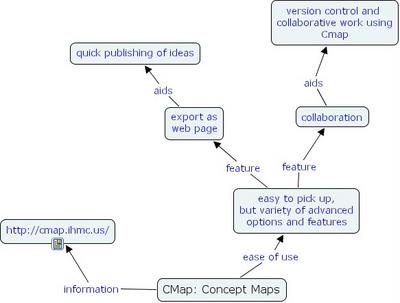
CMap seems very easy to get started with, and it is very easy to export your maps as a web site. There are other features to explore such as collaborative tools make it easy for you to share your work with others around the world, and work together on projects. I have mapped some notes on it.

There are one or two issues with the software, which perhaps will be dealt with before its proper release (the currect version is a Beta or test release). For example it 'leaks' memory quite fast meaning you have to restart your PC after using it for a while.

06 April, 2005

Creating Passionate Users

0 comments
My new favourite blog is found at http://headrush.typepad.com/creating_passionate_users/ - it is even more inspiring than Cakes and talks a lot about how people learn, and how people are prevented from learning well. Brain-based learning they sometimes call it.

22 December, 2004

Furl

0 comments
http://www.furl.net/index.jsp

Use Furl to save copies of Web Pages which you want to store as they are, forever.

I use it to keep copies of articles and news which I don't expect to be online for ever, or which I am referencing in work that I do.

Join Furl and get the toolbar, and you are given 5 Gb of server space to save these pages.